Is The Battery Swap Enough To Justify the Switch?
DJI unveiled Dock 4 on 14 October 2026, bringing a striking promise to automated drone operations: an aircraft can land, exchange its battery and fly again in under 45 seconds under DJI’s test conditions. Dock 3 takes a different approach. Its drone stays in the dock and charges, with a published 15%-to-95% charge time of 27 minutes.
That’s big if you run frequent patrols, respond to incidents or inspect industrial sites throughout the day.
Yet an upgrade decision doesn’t just come down to time. Dock 4 is heavier, draws more peak power, works with only one new aircraft model and needs a separate O4 Ground Station. Meanwhile, Dock 3 supports a mapping-oriented aircraft and vehicle-mounted use.
Here is how the two systems compare, where the new dock earns its place and when your current setup may already be the sensible choice.
DJI Dock 4 Vs Dock 3 Specifications
From battery turnaround to aircraft compatibility, see how the two DJI Dock systems compare.
| Feature | DJI Dock 4 | DJI Dock 3 |
|---|---|---|
| Release Positioning | Automated battery-swapping dock | Recharge-based dock with vehicle-mounting capability |
| Compatible Drones | DJI Matrice 5TD only | DJI Matrice 4D or Matrice 4TD |
| Between-Flight Turnaround | Under 25 seconds for battery swapping; under 45 seconds from landing to next takeoff | Approximately 27 minutes to recharge from 15% to 95% |
| Maximum Flight Time | 59 minutes | 54 minutes |
| Maximum Operating Radius | 10 km | 10 km |
| Dock Weight | 66 kg, excluding batteries and aircraft | 55 kg, excluding aircraft |
| Maximum Dock Input Power | 2,000 W | 800 W |
| Operating Temperature | -40°C to 50°C | -30°C to 50°C |
| Weather Protection | IP56 dock; IP55 aircraft | IP56 dock; IP55 aircraft |
| Landing Wind Limit | 12 m/s | 12 m/s |
| Drone Imaging Options | Matrice 5TD with visible and thermal imaging | Matrice 4D for mapping-oriented applications; Matrice 4TD for thermal inspection |
| Connectivity Architecture | Requires DJI O4 Ground Station | Built-in dock transmission antennas |
| Deployment Distinction | Stationary automated battery-swap deployment | Supports vehicle-mounted deployment |
Note: Figures are published manufacturer specifications and may depend on testing conditions, configuration and operational environment. Sources: DJI Dock 4 Specifications and DJI Dock 3 Specifications.
The Battery Swap Changes The Daily Flight Schedule
Twenty-Five Seconds Swap (Within the Operation)
Dock 4 takes less than 25 seconds to exchange the battery after its cover has fully closed. That’s less than 45 seconds from one landing to the next takeoff.
Keep this in mind though: the shorter number does not include the entire landing-and-relaunch sequence. Both figures come from controlled testing, and a real deployment still needs acceptable weather, healthy batteries, a clear launch area and an authorised flight plan.
Dock 3’s 27-minute benchmark covers charging an aircraft from 15% to 95% at 25°C. It is not a mandatory delay after every brief flight: a drone returning with substantial charge may need less time. Equally, a full workday with repeated long sorties can make charging a real bottleneck. Dock 4 attacks that particular bottleneck rather than raising flight time alone.
Three Stored Batteries And Two Charging Channels
Dock 4 has four battery compartments, although DJI permits a maximum of three batteries across them. Two can charge in parallel, and each takes a stated 27 minutes to move from 15% to 95% at 25°C. This is an important detail: batteries are recharged behind the scenes while the drone is away. The dock swaps depleted packs rather than making the aircraft wait beside a charger.
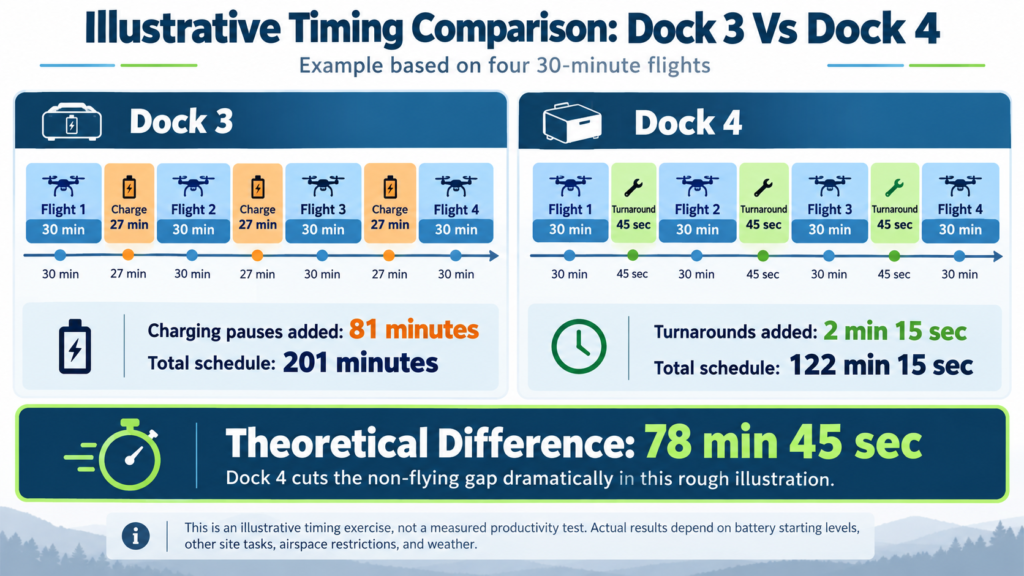
For a rough illustration, suppose you schedule four 30-minute flights. With a 27-minute charging pause between Dock 3 flights, three gaps add 81 minutes to the schedule. Three Dock 4 turnarounds of 45 seconds total just 2 minutes 15 seconds. The theoretical difference is 78 minutes 45 seconds. That is an illustrative timing exercise, not a measured productivity test: battery starting levels, other tasks, airspace restrictions and weather can change the actual outcome.
There is still one aircraft per dock. An unexpected drone fault, blocked landing pad or exhausted charged-battery reserve can interrupt operations. A faster swap also creates more battery cycles, so operators should track pack condition and replacement costs rather than treating batteries as an unlimited resource.
Flight Time Improves, But Both Systems Have A 10 Km Radius
The new Matrice 5TD has a maximum published flight time of 59 minutes versus 54 minutes for the Matrice 4D/4TD. On paper, that is five additional minutes, or around 9.3% longer. The figures were measured under different laboratory flight conditions, however, so a straight percentage is useful for orientation rather than a guarantee of a 9.3% productivity gain.
DJI also lists 55 minutes of hovering for Matrice 5TD compared with 47 minutes for the Matrice 4D series, and maximum flight distances of 53 km and 43 km respectively. Distances are laboratory claims with specific flight speeds and near-empty endpoints. Reserve enough power to return and land safely, especially over large sites or around structures that require slower flight.
Both docks advertise a maximum operating radius of 10 km under DJI’s stated test assumptions. If your problem is reaching assets farther away, Dock 4 does not automatically widen that circle. You may need another suitable dock location, a different aircraft architecture or a reworked operational concept.
The Aircraft Choice May Matter More Than The Dock
Matrice 5TD Brings Sharper Thermal Data
Dock 4 supports the Matrice 5TD exclusively. Its thermal camera has a native resolution of 1,280 × 1,024, or 1,310,720 pixels. Matrice 4TD’s native 640 × 512 thermal sensor captures 327,680 pixels. That gives the new aircraft four times as many native thermal pixels.
Be careful comparing enhanced-resolution modes: Matrice 4TD can also output 1,280 × 1,024 images through its UHR function, which is not the same as a sensor with four times the native pixel count.
For substation monitoring, photovoltaic checks or finding suspect hot components, more native detail can be valuable. Matrice 5TD also extends its low-gain thermal measurement range to 550°C, up from 500°C on Matrice 4TD. Both publish thermal sensitivity at or below 50 mK under stated conditions. Thermal accuracy remains dependent on emissivity, reflections, distance, conditions and correct interpretation; a higher pixel count cannot solve all of those problems.
Dock 3 Still Offers A Dedicated Mapping Option
Dock 3 works with either Matrice 4D or 4TD. The 4D carries a 20 MP, 4/3-inch wide-angle camera with a mechanical shutter, adjustable f/2.8–f/11 aperture and RAW support. Those characteristics suit repeatable photogrammetry missions where motion artefacts, exposure control and image consistency matter. The 4TD instead emphasises thermal inspection, using a 48 MP wide camera alongside its infrared payload.
Matrice 5TD combines three 50 MP visible cameras with thermal sensing, including a roughly 23.5 mm-equivalent wide view, 70 mm medium tele and 252 mm tele camera. It is a versatile inspection aircraft, with the longer telephoto reach offering more framing options when operators must keep their distance from equipment. Still, buyers focused on survey-grade imagery should compare full capture workflows, shutter behaviour and deliverable quality before replacing a Matrice 4D setup.
Obstacle Sensing And Onboard AI Expand The Inspection Toolkit
Matrice 5TD integrates LiDAR and millimetre-wave radar alongside its vision sensing. Those systems can add situational information around wires, vegetation and complex industrial structures, although the manufacturer’s obstacle avoidance limits still apply. DJI also reports onboard AI detection for 17 object categories. Treat that as support for finding or classifying recognised objects, not an automatic diagnosis of corrosion, adhesive debonding or structural defects.
For example, a remote operator responding to a utility alarm might dispatch the aircraft, inspect the affected bay using visible and thermal feeds, mark an area for closer review and send findings to the maintenance team. A specialist still needs to interpret what the image shows and determine whether a component needs urgent attention. Inspections involving blade subsurface conditions, precise defect sizing or formal acceptance criteria can require specialist sensors and validated analysis beyond either dock’s default capabilities.
Dock 4 Changes The Communications And Installation Plan
The O4 Ground Station Is Mandatory
Dock 4 cannot operate without the O4 Ground Station. That unit supports transmission, RTK services and the network connection, including Ethernet and optional cellular configurations. It can be positioned to improve signal conditions near buildings or other obstructions. The dock is therefore part of a larger installed system, not a single self-contained cabinet that you can deploy without planning.
DJI lists drone-to-FlightHub 2 cloud latency as low as approximately 160 milliseconds in its test conditions and promotes data transfer up to 80 MB/s over a close-range Wi-Fi link. Network quality, regional radio-band availability and actual files affect performance. The Matrice 5TD additionally supports dual 4G modules where the service is available; that capability should not be treated as universal cellular coverage.
Dock 3 Has A Clear Mobile Deployment Advantage
Dock 3 was DJI’s first dock designed for vehicle mounting. That appeals to utilities inspecting scattered sites, disaster-response teams moving between locations and contractors who need a temporary base rather than a permanent installation. DJI also supports the Matrice 4D-series aircraft as standalone platforms with a compatible controller, adding flexibility outside a fixed dock.
Dock 4 shares Dock 3’s 400 × 400 mm mounting hole pattern, which can simplify part of a site conversion. The weight rises from 55 kg to 66 kg, a 20% increase before comparing the different excluded items, and the closed enclosure dimensions also change. Check foundation loading, clearances, cable routing and the ground station location before ordering replacement hardware.
Weather And Power Affect Procurement Choice
Both docks carry IP56 protection and allow landings in winds up to 12 m/s. Dock 4 increases the dock’s stated low-temperature operating limit from -30°C to -40°C; the Matrice 5TD is rated down to -40°C, compared with -20°C for Matrice 4D-series aircraft. Those numbers can influence an installation in a cold climate. Your operation still needs to account for icing, wind gusts, precipitation and the aircraft’s own flight limitations.
Dock 4 draws up to 2,000 W according to its input-power rating, compared with 800 W for Dock 3. These are maximum input ratings, not typical electricity consumption. Charging two batteries, heating or cooling equipment and other conditions change instantaneous demand. A proper site survey should investigate available electrical capacity, backup arrangements, surge protection and the network connection, especially at remote substations or wind farms.
The backup systems are also different. Dock 3 has a lead-acid battery rated for more than four hours of backup support under DJI’s test assumptions. Dock 4 uses batteries from its aircraft-battery storage compartments and quotes approximately 4.5 hours per battery, with sequential supply across as many as three. Neither system should be expected to continue normal charging or climate-control operation during a power failure. Document how the installation recovers after power is restored.
What Will An Upgrade Actually Cost You?
DJI does not present one universally applicable installed price for every Dock 4 deployment.
Ask an authorised dealer for a written, itemised quote covering the dock, Matrice 5TD, O4 Ground Station, appropriate batteries, connectivity, commissioning, training, spares and service support. Add software subscriptions and any cloud or on-premises integration work. Dock 3 owners should also ask about trade-in or resale prospects and the remaining useful life of their existing aircraft.
You can then calculate an operating case using your own logs. Count missions per week, average turnaround time, the share of jobs held up by charging, labour spent moving crews between sites and the value of reducing response time. For an emergency team, seconds may be operationally valuable even when annual flight totals are modest. For a survey contractor completing a few planned missions each day, the return may be harder to establish.
Three Examples That Show Where Each Dock Fits
A Busy Substation With Repeated Thermal Checks
Suppose your operations team runs frequent visible and thermal checks across a large electrical facility, including follow-ups after alarms. The Matrice 5TD’s native thermal detail and short turnaround are credible reasons to examine Dock 4. Plan repeatable waypoints, suitable camera angles and human review of temperature anomalies. You should also verify safe distances around energised equipment and any electromagnetic or communication issues during commissioning.
A Regional Mapping Programme
Now take a contractor producing regular orthomosaics and 3D models across multiple locations. A Matrice 4D paired with Dock 3 may remain more aligned with the imaging job, especially where its mechanical shutter and RAW capture already produce accepted client deliverables. Validate any proposed Matrice 5TD replacement using a sample site, comparable ground control and your actual processing software. Sensor specifications alone will not establish survey accuracy.
A Mobile Incident-Response Team
A vehicle-based emergency unit may benefit from Dock 3’s supported mobile deployment. Dock 4’s rapid turnaround is appealing during a long incident, although that advantage needs to be weighed against its installation architecture and deployment suitability. Ask DJI or the dealer to confirm the exact supported mobile configuration for your intended region and version before designing a vehicle around it.
So, Is The Battery Swap Enough To Justify An Upgrade?
For teams whose operations are repeatedly delayed by recharging, Dock 4 deserves a serious procurement review. The upgrade is more compelling when that scheduling advantage comes together with a requirement for stronger thermal detail, modern sensing and rapid incident response. A working Dock 3 remains a credible choice for planned missions, mapping-heavy assignments and mobile setups where its capabilities already satisfy the brief.
Make the decision using a timed field demonstration. Run the same route, collect representative imagery, measure total mission-to-mission time, examine data quality and account for your complete installation costs. That will tell you far more than comparing the largest numbers on two product sheets.
Frequently Asked Questions
How Fast Does DJI Dock 4 Swap A Battery?
DJI Dock 4 swaps a battery in less than 25 seconds under controlled test conditions. DJI separately specifies a landing-to-next-takeoff turnaround of less than 45 seconds, which is the more useful figure for planning consecutive missions.
Can You Use Matrice 4D Or 4TD With Dock 4?
No, DJI Dock 4 is compatible only with Matrice 5TD. Existing Matrice 4D and 4TD aircraft are designed for Dock 3, so changing docks requires an aircraft change as well.
Is DJI Dock 4 Better For Thermal Inspection?
Yes, Dock 4’s Matrice 5TD offers a higher native thermal resolution than the Matrice 4TD used with Dock 3. The newer system provides 1,280 × 1,024 native thermal pixels versus 640 × 512, although practical defect detection still depends on mission geometry, conditions and interpretation.
Does Dock 4 Have A Longer Operating Range?
No, DJI lists a maximum operating radius of 10 km for both Dock 4 and Dock 3 under its respective test conditions. Dock 4’s new aircraft has a longer published maximum flight distance, which is a separate measure.
Is Dock 4 Better For Drone Mapping?
Not automatically, because Dock 3 supports the Matrice 4D with a mechanical-shutter, 20 MP wide camera and RAW capture. Compare project accuracy and output quality with your existing mapping workflow before changing aircraft.
Do You Need The O4 Ground Station For Dock 4?
Yes, the DJI O4 Ground Station is mandatory for Dock 4 operation. Its placement, power and network connections should form part of your site engineering and total-cost assessment.
Can Dock 4 Operate Without A Pilot On Site?
Yes, Dock 4 supports remotely managed flight operations without a pilot physically beside the aircraft, subject to applicable permissions and a suitable operating setup. Aviation rules, supervision requirements and any BVLOS approvals still depend on the jurisdiction and specific mission.